DNS Checker Tool: The Complete Guide to DNS Propagation and DNS Records
DNS Checker Tool: The Complete Guide to DNS Propagation and DNS Records
Introduction
You updated your DNS settings, migrated your website, configured a new mail server, or added an SPF record—but how do you know whether the change is actually live?
This is where a DNS checker tool becomes useful.
DNS changes don't appear instantly across the entire internet. They gradually become visible as DNS resolvers update their cached information. This process is known as DNS propagation.
During this period, users in different locations may receive different DNS responses for the same domain.
For developers, system administrators, DevOps engineers, and website owners, being able to quickly verify DNS records can save significant troubleshooting time.
The VoidOnyx DNS Checker provides a browser-based way to check published DNS records and understand what DNS resolvers are currently returning for a domain.
What Is DNS?
DNS, or the Domain Name System, translates human-readable domain names into information that computers and network services can use.
For example:
example.com
      ↓
DNS Resolution
      ↓
IP Address
      ↓
Web Server
Instead of remembering an IP address such as:
203.0.113.10
users can access:
example.com
DNS therefore acts as one of the fundamental components of the internet.
What Is DNS Propagation?
DNS propagation is the process through which a DNS change becomes available to DNS resolvers and users across different networks.
When you modify a DNS record, the change does not necessarily become visible everywhere immediately.
Several factors affect this process.
1. DNS Caching
DNS information can be cached by multiple layers, including:
- Internet Service Providers
- Corporate networks
- Operating systems
- Web browsers
- Recursive DNS resolvers
A cached response may continue to be used until its expiration time.
2. TTL — Time to Live
Every DNS record can have a TTL, or Time to Live.
TTL determines how long a resolver can cache a DNS response before requesting updated information.
For example:
DNS Record
TTL: 3600 seconds
This means the record may be cached for approximately:
3600 seconds = 1 hour
The uploaded article notes that propagation can range from a few minutes to as much as 48 hours depending on caching and TTL-related factors.
Why Do You Need a DNS Checker Tool?
Manually troubleshooting DNS using command-line utilities can work, but it can become inconvenient when you need to repeatedly verify multiple records.
A DNS checker tool provides a faster way to inspect DNS information.
Common situations where DNS checking is useful
Website Migration
After moving a website to another hosting provider, you may update:
A Record
or:
AAAA Record
A DNS checker helps verify whether the new destination is being returned.
Email Configuration
Email authentication commonly relies on:
MX
TXT
CNAME
records.
For example, SPF, DKIM, and DMARC configurations require correctly published DNS records.
Subdomain Configuration
A CNAME record may be used for:
blog.example.com
or:
app.example.com
A DNS lookup can confirm whether the expected target is published.
DNS Troubleshooting
If a website is not resolving correctly, checking:
A
AAAA
NS
SOA
records can help narrow down the problem.
The source article specifically highlights domain migrations, email deliverability, downtime prevention, and troubleshooting as important reasons to perform DNS checks.
Meet the VoidOnyx DNS Checker
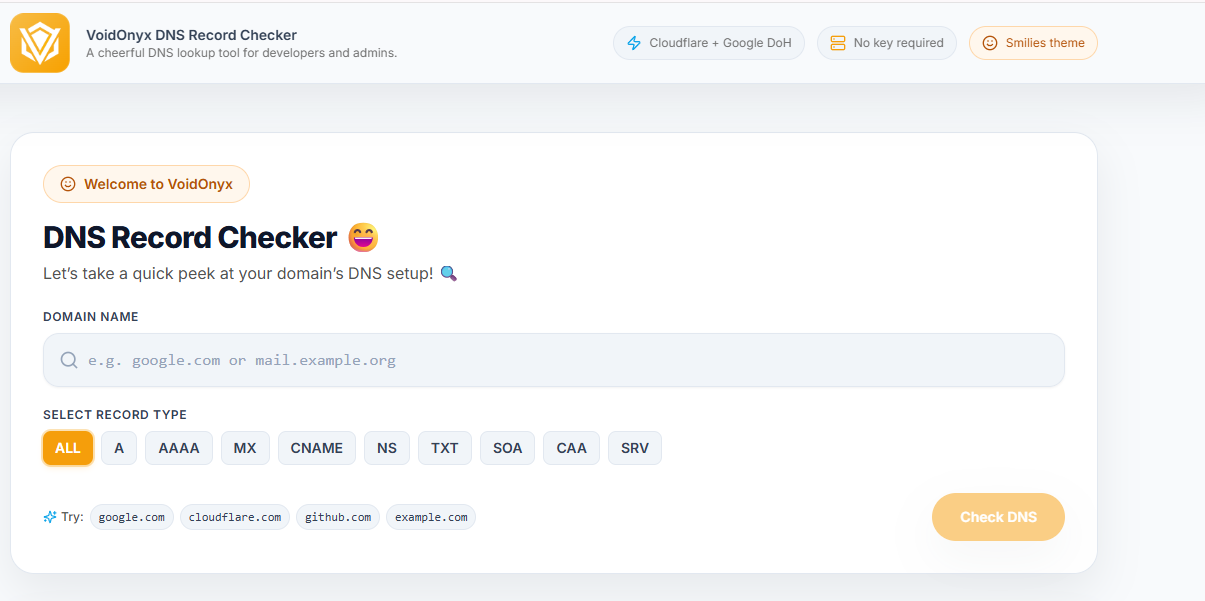
The VoidOnyx DNS Checker is a browser-based DNS lookup tool designed to provide an easy way to inspect DNS records for a domain.
Users can enter a domain and select a particular DNS record type or check all supported records together.
According to the article, the tool validates input, checks its cache for recent identical requests, and performs fresh DNS-over-HTTPS lookups when required.
Basic Workflow
Enter Domain
     ↓
Validate Input
     ↓
Check Cache
     ↓
DNS-over-HTTPS Lookup
     ↓
Return DNS Records
     ↓
Display Type + Value + TTL + Status
The tool uses Cloudflare's public DoH endpoint as its primary source and Google's DoH service as a fallback, according to the supplied article.
Supported DNS Record Types
Understanding DNS records is important when troubleshooting domain configuration.
RecordPurposeAMaps a domain to an IPv4 addressAAAAMaps a domain to an IPv6 addressCNAMEPoints a hostname to another domainMXSpecifies mail serversTXTStores text-based configuration and verification informationNSIdentifies authoritative name serversSOAContains administrative information about a DNS zonePTRPerforms reverse DNS mapping
The VoidOnyx article identifies these eight record types as supported by the tool.
Understanding A Records
An A record maps a hostname to an IPv4 address.
Example:
example.com → 192.0.2.10
When a website suddenly stops loading after a hosting migration, the A record is one of the first DNS records worth checking.
Understanding AAAA Records
An AAAA record maps a hostname to an IPv6 address.
Example:
example.com → 2001:db8::10
As IPv6 adoption increases, checking AAAA records becomes increasingly important when diagnosing connectivity problems.
Understanding CNAME Records
A CNAME, or Canonical Name record, maps one hostname to another hostname.
For example:
www.example.com
       ↓
example.hosting-provider.com
CNAME records are frequently used with:
- CDNs
- SaaS platforms
- Hosting providers
- Third-party services
- Subdomains
Understanding MX Records
MX records determine which mail servers handle email for a domain.
For example:
example.com
     ↓
MX
     ↓
mail.example.com
If MX records are incorrect, incoming email may fail or be routed incorrectly.
Understanding TXT Records
TXT records are commonly used for domain verification and email authentication.
Common applications include:
- SPF
- DKIM
- DMARC
- Domain verification
- Service ownership verification
For example:
_dmarc.example.com
may contain a DMARC policy.
The supplied article specifically recommends checking TXT records when configuring SPF, DKIM, and DMARC.
Understanding NS and SOA Records
NS Records
NS records identify the authoritative name servers responsible for a domain.
They are particularly useful when investigating:
- Delegation problems
- Nameserver changes
- Domain configuration issues
SOA Records
The Start of Authority (SOA) record contains administrative information about a DNS zone, including information related to the primary nameserver and zone timing.
These records can be especially useful during DNS infrastructure troubleshooting.
What Is DNS TTL?
TTL stands for Time to Live.
It tells DNS resolvers how long they may cache a DNS response.
For example:
A Record
Value: 192.0.2.10
TTL: 3600
A TTL of 3600 seconds corresponds to approximately one hour.
Why TTL Matters
Suppose you change:
Old Server
192.0.2.10
to:
New Server
192.0.2.20
Resolvers that still have the old record cached may continue returning:
192.0.2.10
until the cached information expires.
This is one reason DNS propagation can appear inconsistent.
DNS-over-HTTPS and DNS Checking
Modern DNS lookup tools can use DNS-over-HTTPS (DoH) to perform DNS queries over HTTPS.
Conceptually:
Browser
   ↓
HTTPS
   ↓
DoH Resolver
   ↓
DNS Resolution
   ↓
DNS Response
The VoidOnyx DNS Checker uses public DoH infrastructure for its lookup process, with Cloudflare as the primary source and Google as a fallback according to the supplied article.
Real-World Example: Website Migration
Imagine a company moves its website from:
Old Hosting Provider
        ↓
192.0.2.10
to:
New Hosting Provider
        ↓
192.0.2.20
The DNS A record is updated.
Instead of repeatedly running individual DNS commands, the administrator can use a DNS checker to verify the current DNS response.
A useful migration checklist is:
✓ A record
✓ AAAA record
✓ NS records
✓ MX records
✓ TXT records
✓ TTL
✓ DNS status
This provides a more structured way to determine whether the required DNS configuration has been published.
The source article presents this migration scenario as a practical example of using the VoidOnyx tool to inspect multiple records from one interface.
Who Can Use a DNS Checker?
Web Developers
Developers can use DNS lookup tools to:
- Verify A and AAAA records
- Check CNAME configuration
- Troubleshoot subdomains
- Verify CDN configurations
- Confirm hosting changes
System Administrators
System administrators can use them to:
- Investigate DNS delegation
- Check NS records
- Inspect SOA records
- Monitor DNS changes
- Troubleshoot infrastructure
DevOps Engineers
DNS checking can be useful during:
- Infrastructure migrations
- Deployment changes
- Domain cutovers
- CDN configuration
- Incident investigation
Website Owners
Website owners can use DNS checkers without needing to understand every command-line DNS utility.
They can inspect:
A
MX
TXT
CNAME
NS
records directly from a web interface.
DNS Checker vs Manual DNS Lookup
FeatureManual LookupDNS Checker ToolRequires terminalUsuallyNoMultiple recordsManual commandsCentralized viewTTL visibilityDepends on commandDisplayedStatus interpretationManualStructuredBrowser-basedNoYesBeginner-friendlyModerateHighRepeated checksMore effortFaster
The key advantage is not that command-line DNS tools are incapable—it is that a dedicated interface can make repeated DNS verification easier and more accessible.
How to Check DNS Records
Using a browser-based DNS checker generally involves a simple workflow:
Step 1: Enter Your Domain
Enter the domain you want to investigate.
Example:
example.com
Step 2: Select a Record Type
Choose:
A
AAAA
CNAME
MX
TXT
NS
SOA
PTR
or select All where available.
Step 3: Run the DNS Check
The tool performs the DNS lookup.
Step 4: Inspect the Results
Review:
- Record type
- Host
- Value
- TTL
- Status
The VoidOnyx tool's documented workflow follows this general sequence and returns structured DNS information.
Common DNS Troubleshooting Checklist
When a domain is not working as expected, check the following:
Website Not Loading
Check:
A
AAAA
CNAME
Email Not Working
Check:
MX
TXT
DKIM
SPF
DMARC
Domain Not Resolving
Check:
NS
SOA
A
AAAA
Recently Migrated Website
Check:
A
AAAA
NS
TTL
Third-Party Service Verification
Check:
TXT
CNAME
Frequently Asked Questions
How long does DNS propagation take?
DNS propagation depends on factors such as TTL and caching. The supplied VoidOnyx article states that propagation commonly ranges from a few minutes to 48 hours.
Does the VoidOnyx DNS Checker require an account?
No. The supplied article states that the tool can be used directly in a browser without signup or an API key.
Which DNS records should I check after a website migration?
Start with:
A / AAAA
↓
NS
↓
MX / TXT
if email configuration is also involved.
What is the difference between DNS lookup and DNS propagation?
A DNS lookup retrieves DNS information for a domain.
DNS propagation describes the process by which DNS changes become visible through different DNS resolvers and cached systems.
Conclusion
DNS is one of the fundamental systems behind the internet, but DNS changes can be difficult to troubleshoot because caching and TTL values prevent updates from appearing everywhere simultaneously.
A reliable DNS checker tool can make this process considerably easier by allowing users to inspect DNS records, values, TTLs, and statuses from a centralized interface.
The VoidOnyx DNS Checker provides browser-based DNS lookups covering A, AAAA, CNAME, MX, TXT, NS, SOA, and PTR records, with the supplied article describing a DoH-based lookup workflow.
Whether you're migrating a website, troubleshooting a domain, configuring email authentication, or verifying DNS changes, checking the actual DNS response can help replace guesswork with measurable information.
Try the VoidOnyx DNS Checker: tools.voidonyx.in